Theory Mastery

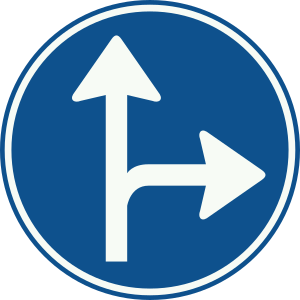
Sign D6: Mandatory: one of the shown directions, e.g. straight or turn.

D6 – Mandatory: one of the shown directions, e.g. straight or turn.

Series: D -- Direction

Legal meaning

Obligation to follow one of the directions of travel indicated on the sign.

Source: RVV 1990 annex 1 · checked 2026-10-23

Shape and colour

Round blue sign with two white arrows (straight up and one slanting sideways): you may go straight or turn in the direction of the side arrow.

Where the sign stands

Just before the junction the order covers, on the right or above the lane.

What the exam asks about this sign

The exam asks what you may do: go straight or turn in the direction of the second arrow, but not the other way and no U-turn. Trap: candidates read it as 'straight compulsory' (D4) or think both turning directions are allowed (D7). Look at the number and direction of the arrows.

Trap

Confusing D4 and D6 as forcing the same single direction.

D4 forces straight ahead ONLY; D6 allows straight ahead OR a turn, your choice.

Exam question on this sign

At a junction in Hengelo there is a round blue D6 sign for your lane with two white arrows: one straight ahead and one to the right. You want to go straight on to the centre. What applies to you here?

  1. Left as well; a blue sign with arrows is only advice
  2. Right; straight on is only a fallback if turning right is not possible
  3. Straight on or right; you choose one of the two arrows yourself
Show the answer

Correct answer: Straight on or right; you choose one of the two arrows yourself

False — you read two equal arrows as a main and a fallback direction. With a sign showing two arrows you follow one of the directions shown, as you choose; so going straight on is simply allowed here.

Why learners get this wrong: A round blue sign with arrows is advice; you may also choose a direction that is not on the sign.

Open this question

Often confused with

Signs in the same series

Nearby signs

Where this is explained

Topics that use this sign

Questions using this

Open in the app